What Health Connect is
Health Connect is Google's health data hub for Android. Apps write data into it, and other apps read data out of it. The Ismaili app reads from it, and never writes to it.
Do you already have it?
It depends on your Android version. Open Settings, then About phone, to check.
| Your Android version | Where Health Connect lives |
|---|---|
| 14 or newer | Built in. Open Settings and search for Health Connect. |
| 8 to 13 | A separate app you install from the Play Store. |
| 7.1 or older | Not available, and ACTIVE cannot work. See unsupported devices. |
Installing it on Android 8 to 13
- Open Health Connect on Google Play, or search for Health Connect in the Play Store.
- Tap Install, and wait for it to finish.
- Go back to The Ismaili app and open ACTIVE again.
What permissions we ask for
We ask to read three things, and we need all three:
- Steps
- Distance
- Active calories burned
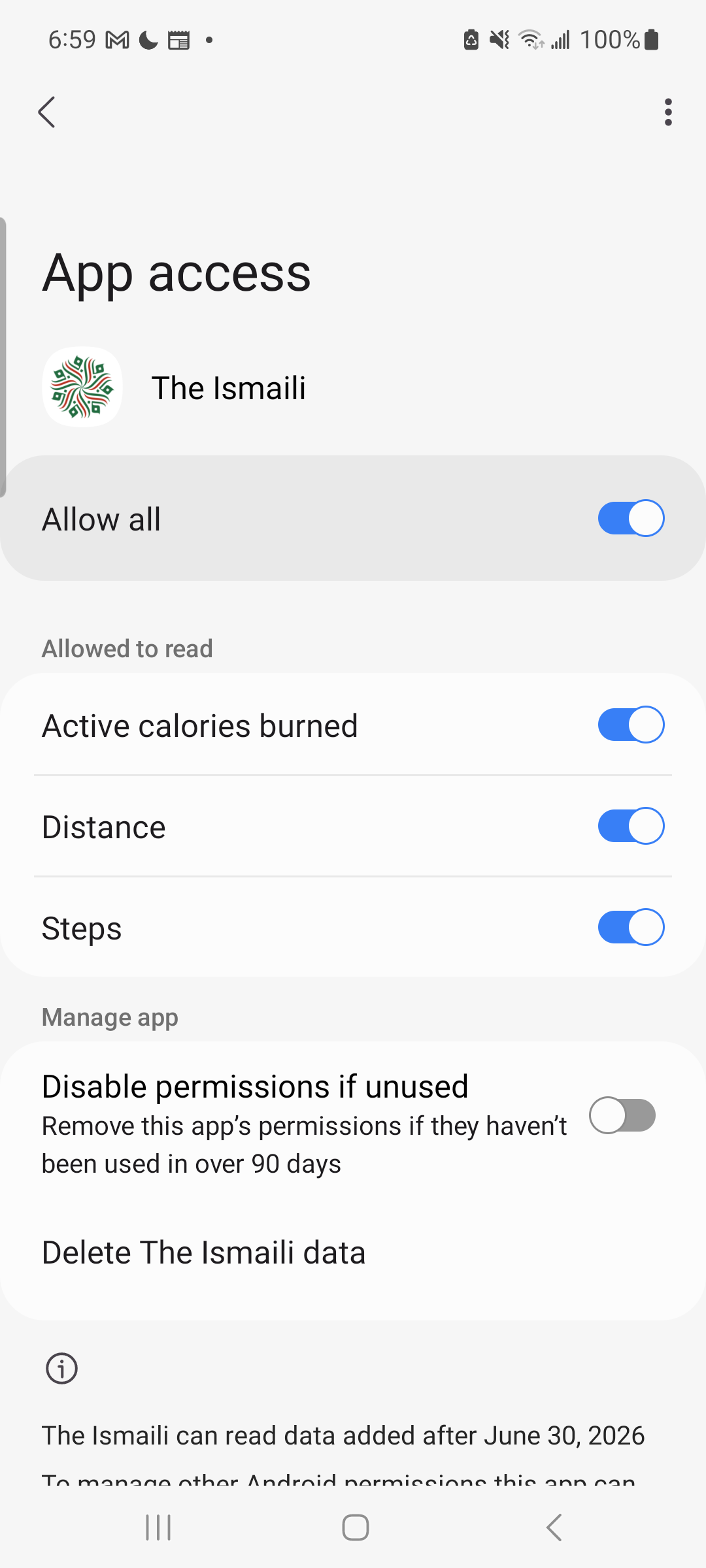
What writes data into it
You need at least one app or watch recording your steps:
- Samsung phones — Samsung Health
- Pixel and most others — Fitbit or Google Fit
- A watch — Garmin, Amazfit and others
Checking whether anything is writing data
- Open Health Connect.
- Tap Data and access, then Activity, then Steps.
- Look under Can write steps.
If that list is empty, that is your problem, and my dashboard shows zero explains what to do.
Turning our access off
Open Health Connect, tap App permissions, then The Ismaili, and turn the permissions off. ACTIVE stops working, and nothing else in the app is affected.